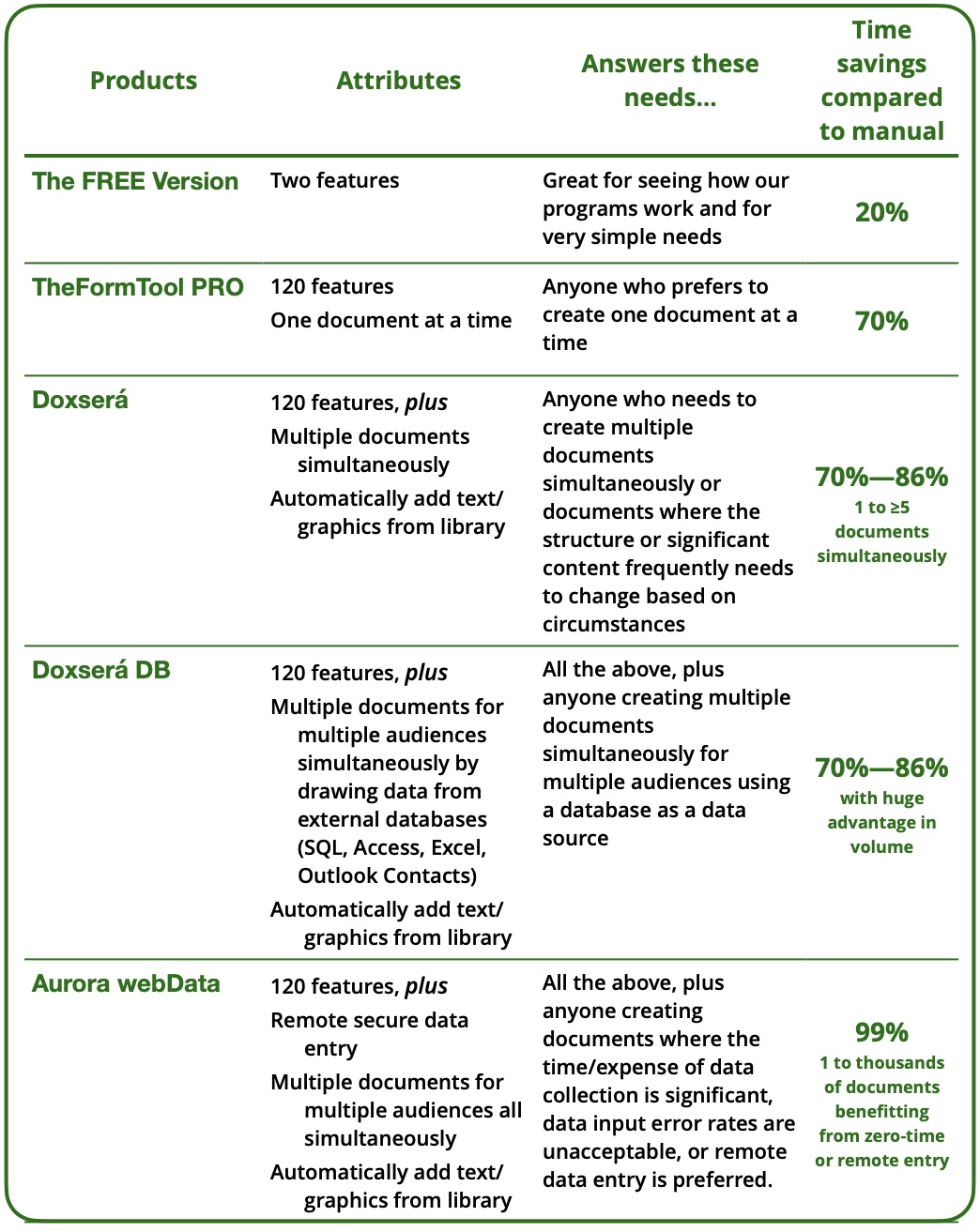
Here’s an instant guide to which of our programs might best suite your needs.

Studies show that document error rates can reach devastating levels ranging up to 60% or more. Document assembly can reduce that to zero.
You and your colleagues are the best talents your have. Use and distribute their expertise by creating a library of the very best forms, then use document assembly to allow everyone in the company to use the best of the best.
Our customers report saving an average of 71% of the time spent on repetitive documents. An impressive 22% reported saving more than 80% of their time.
Customers and clients need and deserve your best work. Spend less time and energy on mundane drudgery and more on creative thinking and expert communications. If documents are part of your work-product and how you’re evaluated, make them perfect… and fast.
Eliminate the risks of using cut & paste from out-of-date forms. Maintain one perfect form for the entire office.
Kevin Craine reported in Output Links that document creation eats up 60% of an office’s time and 45% of its labor costs.
Our customers report that 56% of the documents they create each month are repetitive, where much of the text is constant between uses but needs to be customized based on specific circumstances.
Putting these figures together, more than 25% of the average firm’s total labor expense is invested in the creation of repetitive documents.
That’s 12% of total costs that could be redirected to the bottom line or used to create more opportunities.
Get rid of “wrong name” errors. Eliminate the crisis caused by last-minute changes. Help staff help you by making their jobs easier to perform and much easier to master.
Are you most interested in:
Producing one form at a time at the lowest possible price?

Creating several forms at once, automatically drawing in external text and graphics?

Need to draw data directly from SQL, Access, Excel or Outlook Contacts?

Web-based remote data collection from clients or customers?
Then click

Comparing the features and functions of all our software?
Then click

You can be creating your first form in less than 10 minutes and grow as far as you like, as fast as you desire. No need for IT or expensive consultants.
Our programs work with any modern version of Word for Windows.
Today our programs are in use in more than 200 industries and 80 countries. Perhaps you’ll join us!


“This changes everything!”
Top Tens, A grades, and 5 star reviews






The free version of TheFormTool is a limited-feature version of our software that may answer some of your needs for creating very simple forms and automating documents. It will certainly give you a “feel” for the personality of our family of productivity tools.
This version requires no license or credit card and is a completely free lifetime offering.
Our programs work with any modern version of Word for Windows.

TheFormTool PRO is for professionals who seek real efficiency and perfect accuracy in document-intensive environments.
10-minute learning curve
Reduces cost 70% or more
Eliminates document errors
Uses your documents
Perfect for single documents
No document too complex, or simple
No need for expensive or time-consuming professional installers or consultants
Excellent contract making software
Works within Word for Windows
Purchase, download, and be productive in less than ten minutes!
TheFormTool PRO version is available with a lifetime license.
Our programs work with any modern version of Word for Windows.


Doxserá document assembly software is the answer for those who require all the brilliance of TheFormTool PRO, but with several additional incredibly powerful document automation features.
Doxserá® eliminates errors and improves efficiency seven times or more over old-fashioned “cut and paste.” Subscribe, download, and be productive in less than ten minutes!
Doxserá® is available through an annual subscription and in a one-dollar one-month trial package.
Doxserá® incorporates all of TheFormTool PRO’s features and functions and adds to them powerful new abilities to complete multiple documents at the same time. It also empowers a document to essentially create itself from scratch using external text, tables and graphics.
With the same impressively short and easy learning curve as TheFormTool PRO, in just ten minutes you can be building sets of intelligent documents, reducing errors to zero, and increasing productivity by a factor of ten. Doxserá® is revolutionizing document automation the same way TheFormTool PRO changed document assembly.
Our programs work with any modern version of Word for Windows.

Our programs work with any modern version of Word for Windows.
With Doxserá® DB, a user can customize one or a million documents, with one or a million variables each, for one or a million audiences, all with just a handful of clicks.
Doxserá® DB allows users to easily retrieve, analyze, and use unlimited amounts of disparate information stored in one or multiple external data sources, such as SQL databases and Excel spreadsheets.
Consider DB User for your team members who don’t need the power to author forms but want all the power to use them.
Doxserá DB is the most amazing thing to see in action and a delightfully empowering solution to experience.
Learn more about this newest version of the easiest to use and most powerful document automation software in the world®
Our programs work with any modern version of Word for Windows.
DB User offers all of the user features contained in our most powerful programs, while preventing accidental authoring and unnecessary expense. With DB User in your toolkit, you can deploy the exact mix of tools that best fits your needs, saving expense where that makes sense.
DB User will run any intelligent form created with any of our programs as well as our Aurora webData™ data collection system.
A typical mid-size firm can easily save 40% by mixing a ratio of DB User licenses with Doxserá DB for form authors.
Our programs work with any modern version of Word for Windows.
Aurora integrates powerful web-enabled data capture and a secure dedicated database with the category-defining document assembly and automation capabilities of our revolutionary software. The result is an evolutionary leap in the ability of organizations of every size to define, collect, store, access, utilize and maximize high-value data — quickly, easily and affordably.


Business Law
46 intelligent forms for your library
Elder Law
26 intelligent forms for your library